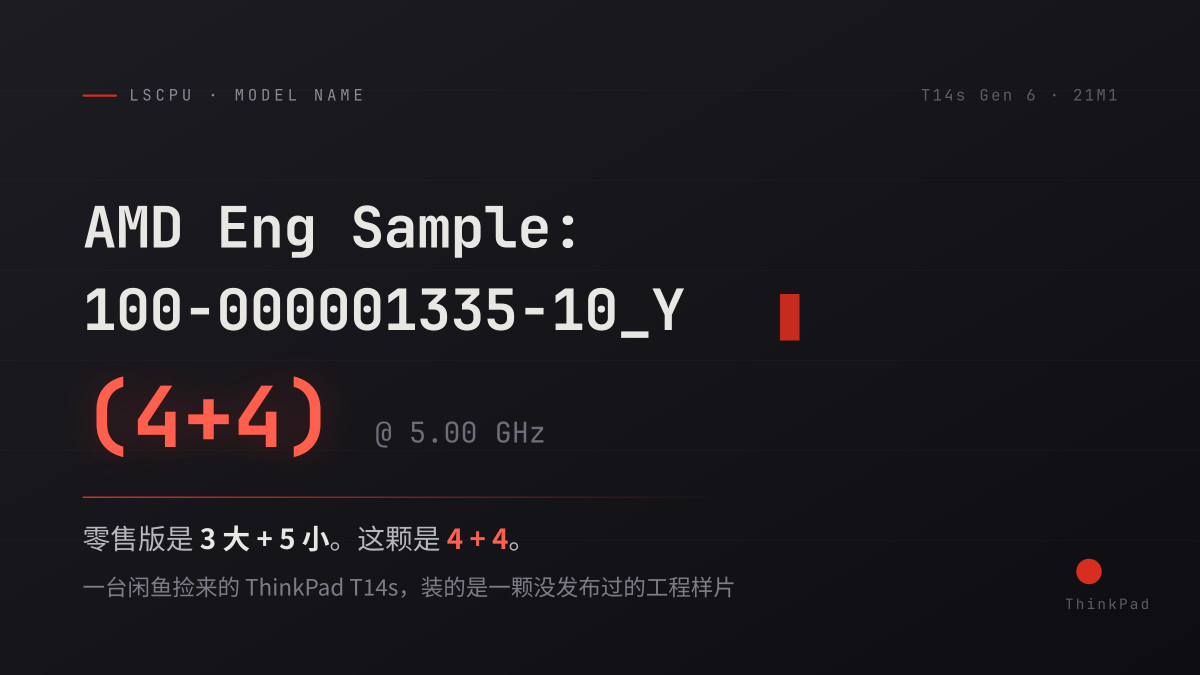
One More P-Core Than Retail: The ThinkPad T14s Gen 6 I Found on Xianyu
1. How It Started: The Patient Shopper’s Defeat
I wanted to play games.
That simple requirement became surprisingly difficult amid the memory price spike of 2026. Upstream DRAM and NAND chips shot up like rockets, pulling prices across the entire PC hardware market upward with them.
It was not a lack of computers. My daily driver is a MacBook; Apple silicon’s efficiency is remarkable, but its legacy game compatibility remains an absolute nightmare. My secondary machine is a Qualcomm 8cx Gen 3 WoA laptop (Windows on ARM). Sitting on an all-ARM lineup, trying to run older x86 titles through translation layers was pure self-inflicted misery.
So I had to look back at x86.
Then came the predictable ending for bargain hunters: prices kept climbing. A Core Ultra 7 228V (Lunar Lake) ultrabook I had been tracking leaped by nearly ¥2,000, brushing ¥6,000. Even entry-level Windows handhelds like the original ROG Ally Z1E hovered near ¥3,000 on the secondhand market.
Running the numbers: if ¥3,000 only bought a two-year-old secondhand handheld, why not browse Xianyu (China’s secondhand electronics marketplace) for a compact ThinkPad laptop with full notebook utility?
That was how I stumbled across this peculiar ThinkPad.
I told myself it was for the TrackPoint — not out of blind brand loyalty, but because I had never owned a ThinkPad and wanted something genuinely durable.
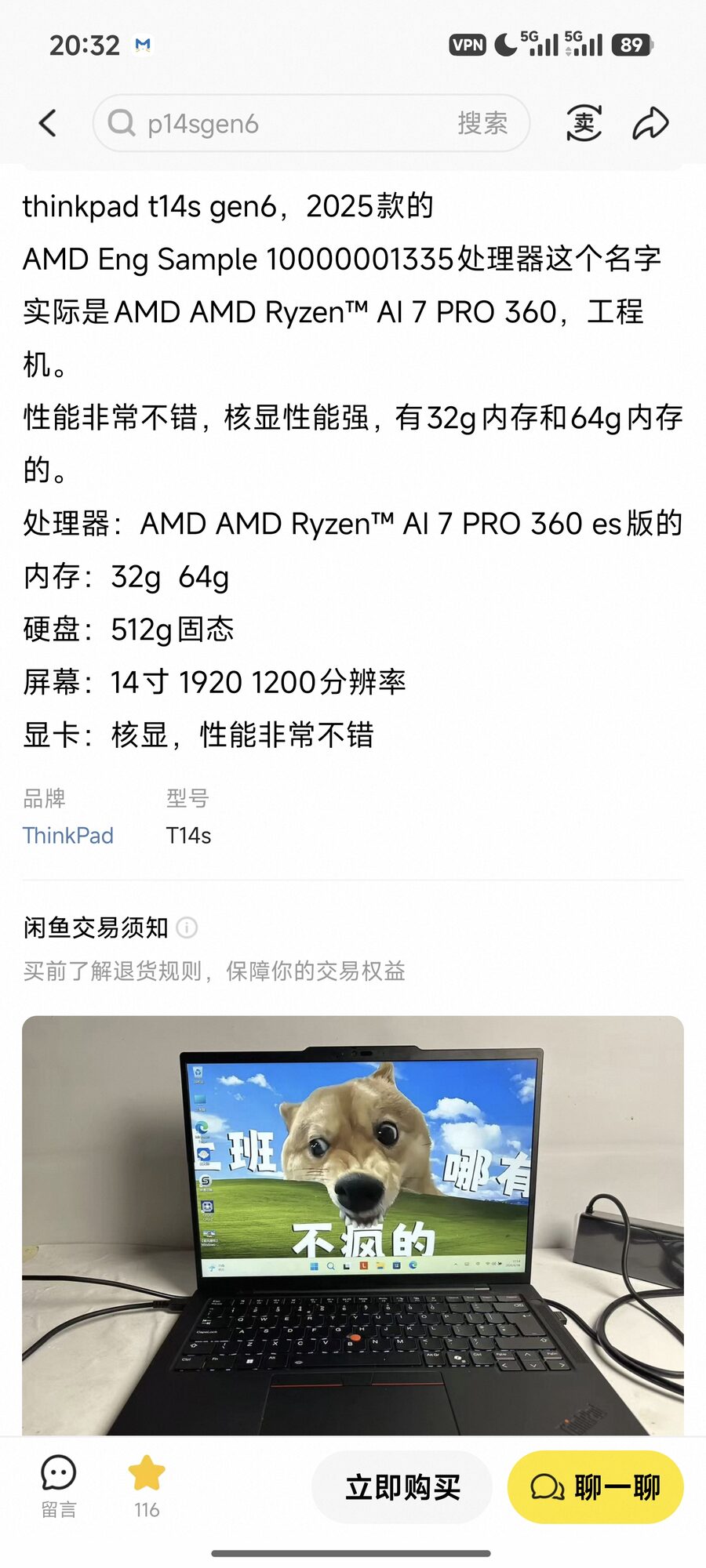
The seller’s listing was unexpectedly precise:
thinkpad t14s gen6, 2025 model The processor labeled AMD Eng Sample 10000001335 is actually an AMD Ryzen™ AI 7 PRO 360. Engineering unit. Solid performance, fast integrated graphics, available in 32GB and 64GB configurations.
¥3,560, no SSD included. Sold.
I went in knowing it was an engineering sample — that was precisely where the discounted price came from. The key detail was the seller’s claim: he didn’t just mention it was an ES unit; he explicitly tied that Eng Sample part number to a concrete retail chip.
He was not wrong. But the full story turned out to be far more interesting.
2. Arrival: Inspect First, Install Later
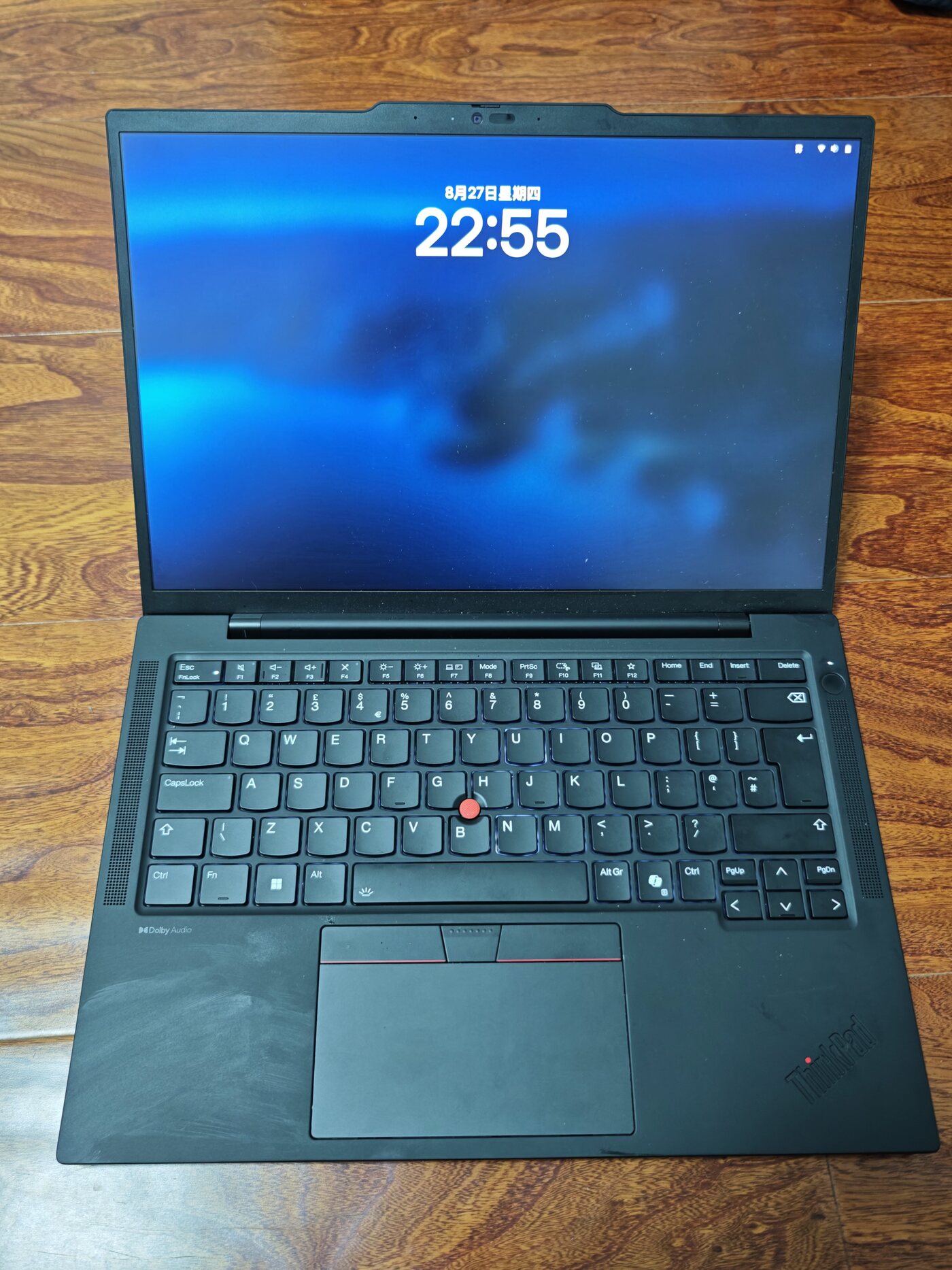
The machine shipped without storage. I slotted in a spare Samsung 990 EVO Plus 2TB, wiped the drive, and installed Arch Linux.
As an aside: I bought that drive brand new two years ago for under ¥800. Today’s market price has nearly tripled. A consumer SSD casually purchased back then has quietly outperformed almost every retail investment vehicle. In a way, the component on this laptop retaining value best is not the rare ES processor, but the drive I screwed in.
Initial inspection checklist:
- ThinkPad T14s Gen 6, MTM
21M1FVT002 - 32GB LPDDR5-7500 soldered memory (4 × 8GiB Micron, running full speed at 7500 MT/s)
- 14-inch BOE
MNE007JA1-2display panel - Qualcomm FastConnect 7800, Wi-Fi 7
- Battery part 5B11H56406, 58Wh design capacity
One complaint about the display: in 2026, the baseline panel remains 1920×1200 at 60 Hz. Checking Lenovo’s official PSREF specs, the AMD variant of the T14s Gen 6 has no high-resolution panel option at all — both choices are 1200p. Coming off a Retina screen, my eyes needed a couple of days to adjust.
The silver lining is the color coverage: the low-res panels come in a poor-gamut touch variant and a 100% sRGB variant. Calculating from EDID readouts, this panel hits 102% sRGB — I drew the better panel.
Two physical quirks on the chassis quickly stood out:
Quirk 1: A Smart Card Reader Was Installed
The left chassis includes an active Smart Card reader slot.
On ThinkPads, this is an enterprise-oriented option typically chosen by corporate, government, or financial fleet orders (used for employee badge access, multi-factor tokens, or encrypted logins). Individual consumers rarely pay extra for this feature. It strongly implies the provenance of this batch.
Quirk 2: 99% Battery Health
Design capacity is 58Wh; measured available capacity was 57.47Wh — 99% health.
For a machine sold as used, this usually indicates one of two things: either the seller replaced the pack, or the laptop sat in factory test racks and almost never underwent standard discharge cycles.
An enterprise card reader paired with an essentially unused battery: both clues point to the exact same origin as the CPU inside.
3. Post-Install Surprise: A Moment of Doubt
Seeing AMD Eng Sample: 100-000001335-10_Y in lscpu was expected — that was the deal when buying an engineering unit.
What caught me off guard was fastfetch.
Immediately after setting up the environment, I pulled up a system summary. The CPU core count line read: 4 P-cores + 4 E-cores.
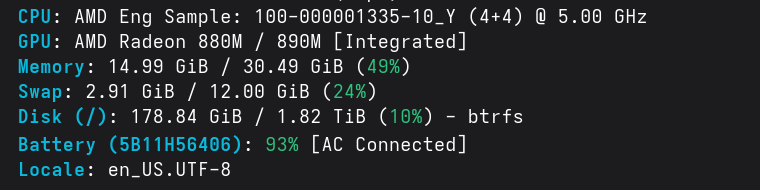
I stared at the terminal output for several seconds.
Something was off.
The official specifications for the Ryzen AI 7 PRO 360 explicitly state 3 P-cores + 5 E-cores.
That unconventional 3+5 asymmetry was something I had double-checked before buying. The total core count matched (8 cores), but the split was fundamentally different.
I flipped the laptop over to inspect the bottom cover and serial labels.
ThinkPad T14s Gen 5
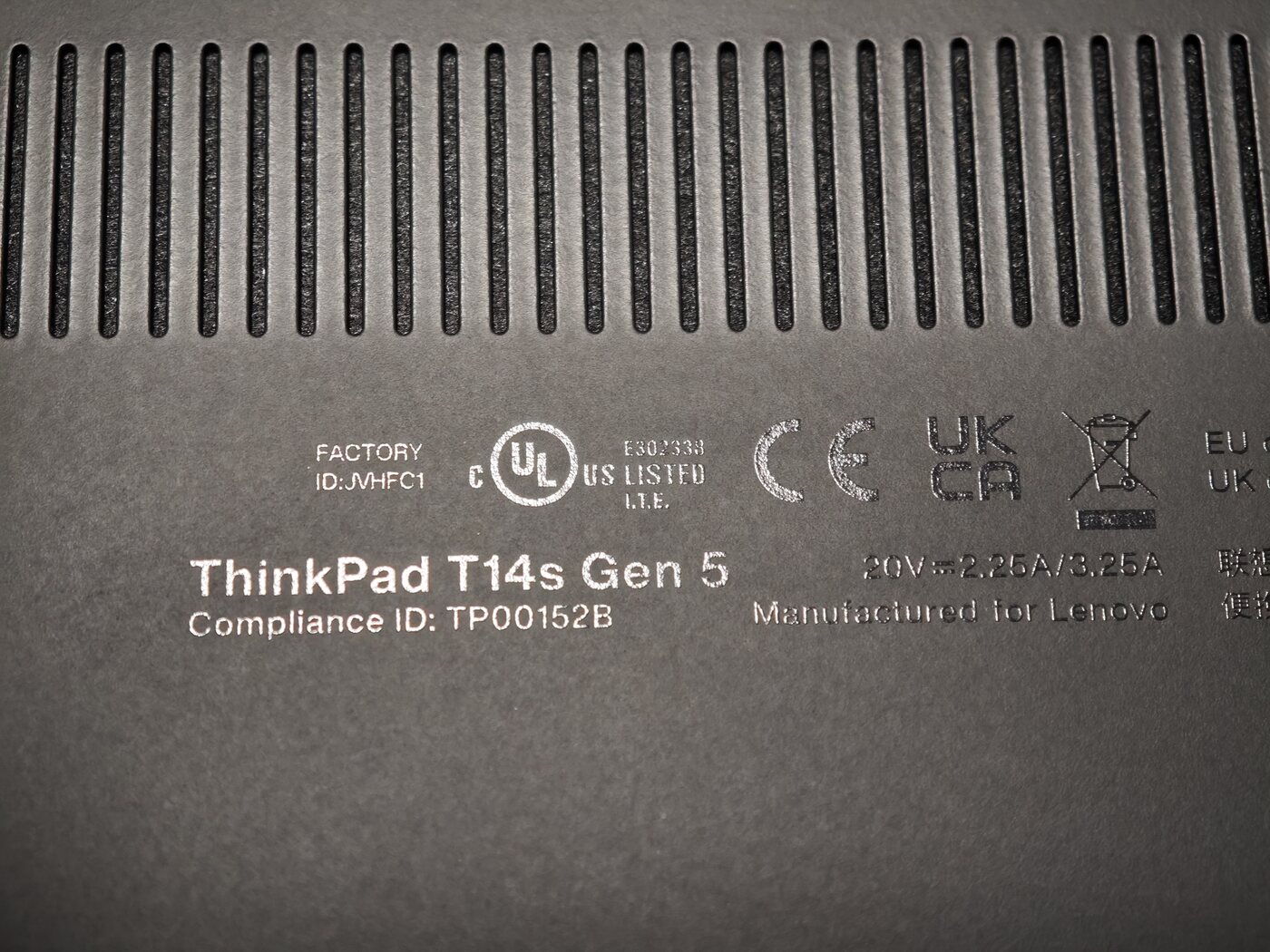
My heart sank for a second.
Gen 5 was the prior generation, powered by Zen 4 Phoenix / Hawk Point (7840U / 8840U). Had I been scammed? Did the seller re-house an older 7840U inside a counterfeit chassis?
And worse: I had already marked the transaction as complete on Xianyu.
Once the initial adrenaline faded, I queried the motherboard DMI tables:
$ cat /sys/devices/virtual/dmi/id/{product_name,product_version,board_name}
21M1FVT002
ThinkPad T14s Gen 6
21M1FVT002
Firmware confirmed Gen 6. The bottom shell said Gen 5.
Crucially, the 21M1 MTM prefix directly matches the T14s Gen 6 AMD SKU, and the motherboard part numbers matched. In short, the motherboard and internal silicon were genuine Gen 6 hardware; only the plastic bottom cover was labeled Gen 5.
The explanation was straightforward: shared tooling.
The D-cover mold dimensions between Gen 5 and Gen 6 are identical. Looking at the interior molding, multiple part numbers across consecutive generations are stamped side by side. When assembling pre-production validation batches, Lenovo’s factory pulled from existing shared chassis stock. It was not an aftermarket shell swap, but factory engineering assembly.
The motherboard was legitimate. That eliminated the scam hypothesis.
Yet the primary puzzle remained: what was this 4+4 processor?
4. Hardware Forensics: Identifying the Silicon
Because this is an engineering sample, the OS cannot look up a standard retail marketing name. Fortunately, silicon-level identifiers cannot be spoofed.
1. Architecture Family
Querying through lscpu: CPU family: 26, Model: 36.
Family 26 is AMD’s designated family ID for Zen 5.
This firmly rules out Zen 4 (Family 25, such as the 7840U). However, Zen 5 mobile encompasses multiple dies. A 4+4 configuration still failed to match the retail 3+5 AI 7 PRO 360.
Could it be a lower-tier processor masquerading as something else?
AMD’s lineup in this generation features two sibling dies: the flagship Strix Point (where the AI 7 PRO 360 originates), and the mainstream Krackan Point. Both share identical CPUID Family / Model designations, making them indistinguishable through CPUID alone.
2. Checking the GPU PCI Device ID
CPUs can conceal their branding; integrated GPU device IDs cannot. Checking the GPU PCI identifier yielded 1002:150E.
Cross-referencing the Linux kernel hardware database:
1114  Krackan  [Radeon 840M / 860M]
150e  Strix    [Radeon 880M / 890M]     ← Match
Krackan is 1114. This machine registered 150E — confirming Strix Point silicon.
3. Counting Physical Compute Units (CUs)
Kernel interfaces provide the physical and active compute unit count:
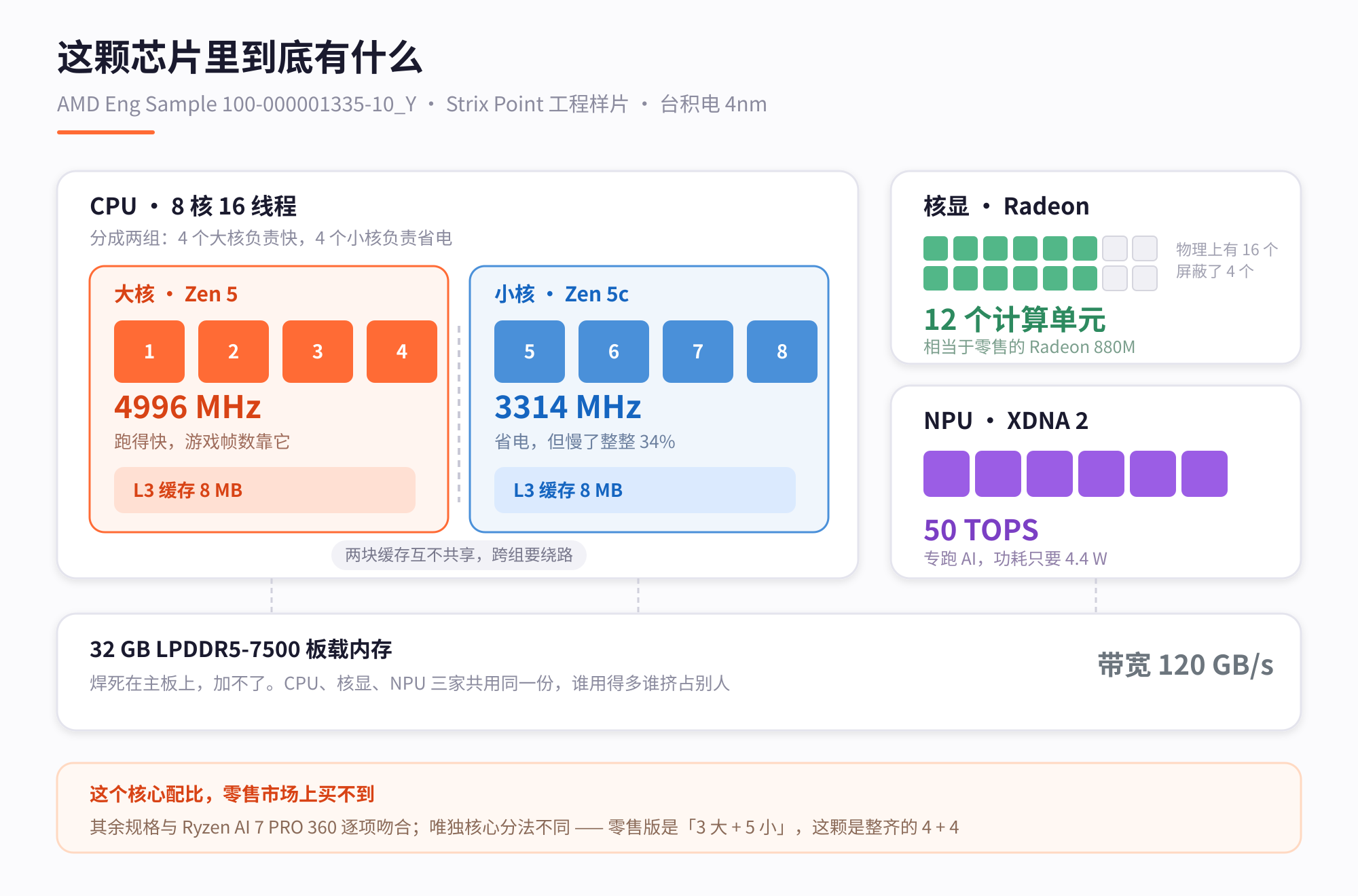
- Physical silicon integrates 16 Compute Units (CUs)
- Currently active in firmware: 12 CUs
16 CUs represents the full physical Strix Point die (Radeon 890M). Operating with 12 CUs enabled corresponds precisely to the Radeon 880M — the exact iGPU configuration of the AI 7 PRO 360. By contrast, the smaller Krackan die physically has only 8 CUs; it cannot be configured to 12 CUs under any circumstances.
This also explains why system utilities could not find a friendly name for the graphics core: the driver database indexes by PCI device ID plus silicon stepping. This sample carries stepping C2. The public driver table lists retail steppings C1, C4, C5, and C6, skipping pre-release C2. Lacking an exact string match, the driver falls back to printing the CPU’s self-reported sample string.
Examining the NPU hardware unit similarly confirmed Strix Point lineage.
Conclusion: The Seller Was Right, But Never Counted the Cores
PCI ID, physical CU count, and NPU codename formed a closed loop: this is a genuine Strix Point die.
In the retail Strix Point catalog, exactly one model features 8 cores and 12 CUs: the Ryzen AI 7 PRO 360.
Architecture, total core count, total L3 cache, iGPU configuration, NPU throughput, and boost clocks align across the board. The seller’s listing was accurate: this is an early validation sample shipped to OEMs for board and electrical verification prior to mass production.
The seller knew it was an AI 7 PRO 360 sample, but had almost certainly never counted the individual P-core and E-core distribution.
5. The Key Difference: An Extra P-Core
Every foundational metric aligned, except for how those 8 cores were partitioned.
Zen 5 mobile employs a hybrid core architecture: Zen 5 (Classic) P-cores feature high clock ceilings and strong single-thread IPC, whereas Zen 5c (Dense) E-cores are optimized for area and energy efficiency, capping out at lower clocks.
Measuring peak clocks across cores on this machine:
cpu0-3, cpu8-11   →  4996 MHz   ← 4 × Zen 5 P-cores
cpu4-7, cpu12-15  →  3314 MHz   ← 4 × Zen 5c E-cores
A clean 4 P-cores + 4 E-cores layout.
Yet on AMD’s official specifications page, the Ryzen AI 7 PRO 360 is listed as 3x Zen 5, 5x Zen 5c. Tech outlets like Tom’s Hardware covered this rare 3+5 asymmetry extensively at launch.
The peak clock disparity between core types is roughly 50% (5.0 GHz vs. 3.3 GHz). In typical desktop workloads and games that rely primarily on a handful of fast threads, P-core clock speeds dictate perceived responsiveness. Having an additional core capable of reaching 5.0 GHz delivers tangible performance advantages.
For cache topology: 4 P-cores share an independent 8MB L3 cluster, while the 4 E-cores share another independent 8MB L3 cluster, totaling 16MB — matching the retail cache capacity.
For ¥3,560, this engineering unit shipped with one more P-core than the official production SKU.
Speculation: The “Uncut 360” That Never Shipped
Comparing the product stack reveals the market logic:
| Model | Zen 5 P-Cores | Zen 5c E-Cores | iGPU Spec |
|---|---|---|---|
| Higher-Tier AI 9 365 | 4 | 6 | 12 CU (880M) |
| This Engineering Sample | 4 | 4 | 12 CU (880M) |
| Production AI 7 PRO 360 | 3 | 5 | 12 CU (880M) |
Against the pricier AI 9 365, this sample possesses identical P-core count and identical graphics hardware, differing only by two efficiency cores.
In everyday laptop usage — web browsing, single-threaded productivity, and gaming — two fewer E-cores barely impact real-world performance. Had AMD released a 4+4 configuration as the AI 7, it would have undercut the costlier AI 9 with virtually no penalty in common tasks.
To enforce market segmentation and preserve profit margins, the retail AI 7 was trimmed by one P-core into a 3+5 configuration. This design choice speaks more to deliberate product tiering than silicon yield limits.
As for why these machines entered the market: the seller’s listing noted options for “32GB and 64GB,” indicating an OEM’s batch of engineering validation hardware was decommissioned together and liquidated into secondary channels.
6. Real-World Use: Can an ES Unit Serve Daily Duty?
Setting specifications aside: is this laptop reliable for daily work?
After two weeks of intensive testing, the answer is yes. Within daily computing workloads, this sample behaves identically to a production processor — with the added benefit of a superior core balance.
- Frequency Stability: Sustains 4.96 GHz in single-thread workloads and holds 4.94 GHz under extended multi-thread load.
- Instruction Set Support: Full instruction sets including AVX-512 are present and operational.
- On-Device AI: The 50 TOPS NPU operates properly, with frameworks and drivers initializing cleanly.
As for gaming performance — the primary motivation for this purchase:
The ROG Ally Z1E I had initially considered features 12 CUs based on RDNA 3. This T14s features 12 CUs on the upgraded RDNA 3.5 architecture. Inside a 14-inch laptop chassis, thermal dissipation and sustained power delivery comfortably surpass a handheld.
Most importantly, legacy game compatibility issues disappeared.
Testing with Kerbal Space Program (KSP), a physics-heavy title where CPU single-thread throughput governs physics simulation:

Launching a complex 87-part rocket yielded the following telemetry:
| Metric | Measured | Threshold / Maximum |
|---|---|---|
| Physics Simulation Ratio | 1.000 (No time dilation) | 1.0 |
| SoC Power Consumption | 14 W | 28 W |
| Core Temperature | 62 °C | 100 °C |
| P-Core Active Frequency | 2,729 MHz | 4,996 MHz |
| 16-Thread Aggregate Load | 192% | 1600% |
In KSP, when CPU capacity falls short of simulating rigid-body physics, in-game time slows down (the physics ratio drops below 1.000). Throughout the launch, the ratio stayed locked at 1.000. SoC power drew only 14W at 62°C, leaving extensive headroom.
The only quirk encountered occurred within an Android emulation container: an occasional frame hitch during mobile gameplay. Profiling scheduler logs showed the game’s render thread hopping erratically across all 16 logical threads, occasionally landing on an E-core. Using taskset to bind the emulator process strictly to the 4 Zen 5 P-cores resolved the stutter instantly, restoring a flat 60 FPS line. This further validated the utility of having an extra P-core in practice.
7. The Trade-Offs
Buying engineering hardware carries genuine trade-offs:
- No Factory Warranty: Engineering samples remain the property of the semiconductor manufacturer. Reaching secondary markets occurs outside authorized retail channels, meaning zero manufacturer support. Buyers must be prepared to handle any hardware issues independently.
- Firmware Power Caps: On the default power profile, factory firmware holds sustained package power to 22W regardless of software adjustments. Connecting a 100W+ USB-PD charger loosened this limit automatically, delivering a ~27% uplift in sustained output without BIOS modifications.
- Firmware Brittleness: Pushing registers or forcing power states under heavy load can trigger kernel panics. During early experimentation, an aggressive hardware probe corrupted the UEFI boot entry table, necessitating a LiveCD chroot to rebuild the EFI partition. Recommendation: Keep everyday usage standard, and avoid brute-forcing low-level registers while loaded.
8. Summary and Secondhand Linux Checklist
In an inflationary market where components continue to rise in price, securing a ThinkPad with 32GB of high-frequency LPDDR5 and Zen 5 + RDNA 3.5 silicon for ¥3,560 represents compelling value.
For anyone inspecting secondhand laptops or engineering samples under Linux, here are 6 essential verification commands to run on day one:
# 1. Verify CPU identifier (check for Eng Sample strings)
lscpu | grep -E 'Model name|Stepping'

# 2. Inspect hybrid core topology and peak boost frequencies
for i in $(seq 0 $(($(nproc)-1))); do
  echo -n "cpu$i: "; cat /sys/devices/system/cpu/cpu$i/cpufreq/cpuinfo_max_freq
done

# 3. Check battery health and original design capacity
upower -i $(upower -e | grep BAT) | grep -E 'energy-full|capacity'

# 4. Read SSD power-on hours and total bytes written (SMART data)
sudo smartctl -a /dev/nvme0n1 | grep -Ei 'power_on|data_units_written'

# 5. Review L3 cache topology and core-sharing clusters
lscpu -C | grep L3
cat /sys/devices/system/cpu/cpu0/cache/index3/shared_cpu_list

# 6. Decode display EDID for panel part numbers and color gamut
edid-decode /sys/class/drm/card*-eDP-*/edid | grep -iE 'Manufacturer|Model|Red|Green|Blue'
Steps 4 and 6 are particularly vital: SSD SMART metrics immediately expose whether a supposedly “lightly used” machine was run continuously in a server rack, while EDID readouts confirm display specifications without needing to disassemble the bezel.
The initial goal was modest: escape ARM translation headaches and secure a dependable x86 companion for gaming.
Surprisingly, after two weeks of Linux configuration, this machine has evolved into an automated lab bench: it runs unattended farming tasks in the background, while a small local model assists in managing telemetry and orientation in KSP.
How to deploy lightweight local models to assist games and automations under Linux will be the subject of the next post.
Benchmark telemetry collected on Arch Linux (Kernel 6.x). Comparative specifications derived from official AMD technical documentation and verified hardware databases.